


This post may contain affiliate links and we may earn compensation when you click on the links at no additional cost to you.
As your family grows, so do the number of events, classes, and appointments. Along with this, the stress of the one one who manages it all, often the mom, also grows. In our house, I manage where everyone needs to be when they need to be there, what bills need to be paid, when we need to pay them, what we’re going to eat on each day. It can be overwhelming, and when no one else seems to be on the same page it makes it harder. If you are the one who is in charge of managing your household, using a shared calendar for your family can help you keep your sanity!
In my school, I was pretty well-known as the Google teacher. I love all things Google! Finding ways that I could make my classroom paperless became an obsession. I learned about a lot of different digital tools that I loved, but Google was by far the simplest and most versatile of them all.
If you are interested in how I use Google to make my life easier at work AND home you can read my last Google post HERE.
Shared Calendars
In this post, we’re going to talk about why using a shared calendar for your family is almost necessary! There are many reasons why using an online calendar can help you personally as well.
Recently, a friend on Facebook posted a status that they had lost ALL their appointments and events that were on their phone calendar because their phone was broken. This really
If you want some great ideas for other ways to use Google to organize your life, make sure to subscribe!
Why using a shared calendar for your family is amazing
Sync to all devices
I can add events on my computer at work while I’m going through all the bills and sorting out my life, then view it on my phone anywhere.
Share Across Accounts
My husband and I both have Google accounts. It is extremely easy for me to share my calendar (and other Google documents, pictures, etc). Anything that my husband and I both need access to (such as the calendar) is shared with him. Now he has it on his phone as well.
Everyone can add events
Both my husband and I have gotten in the habit of putting things directly on our calendar when we make an appointment or someone invites us to something. This way, even if we forget to tell each other no one is surprised. Since the calendar is shared, if he puts something on his calendar, it pops up on mine and vice versa.
No excuses
Along those lines, there are no more “I forgot” or “I didn’t know that was supposed to be today.” Even if I DID forget to tell him about an event (I d
Everyone is on the same page
It can really be exhausting being the one who is constantly reminding the other person where they need to be or what events are coming up. When everyone is continually checking the calendar, no one in the house is the “keeper of the calendar.” This reduces the mental load tremendously.
Don’t lose events and appointments
As mentioned before. Having an online calendar means that it can’t be lost. I can log into my computer and add or edit events and it synchronizes to my phone. If I lose my phone, I still have access to my calendar. When I get my new phone, I go to the settings,
If you want some great ideas for other ways to use Google to organize your life, make sure to subscribe!
Why Specifically Google Calendar?
There are multiple shared calendars out there. The reason Google is great is the fact that it’s packed with useful features. It also integrates with all of your other Google apps. For example, when I use
Getting Google Calendar
Starting a Google calendar is very easy! All you have to do is create a Google account!
This will be your account for ALL things Google. You can also use it to log in to different pages without having to create a new account. This makes things a lot easier!
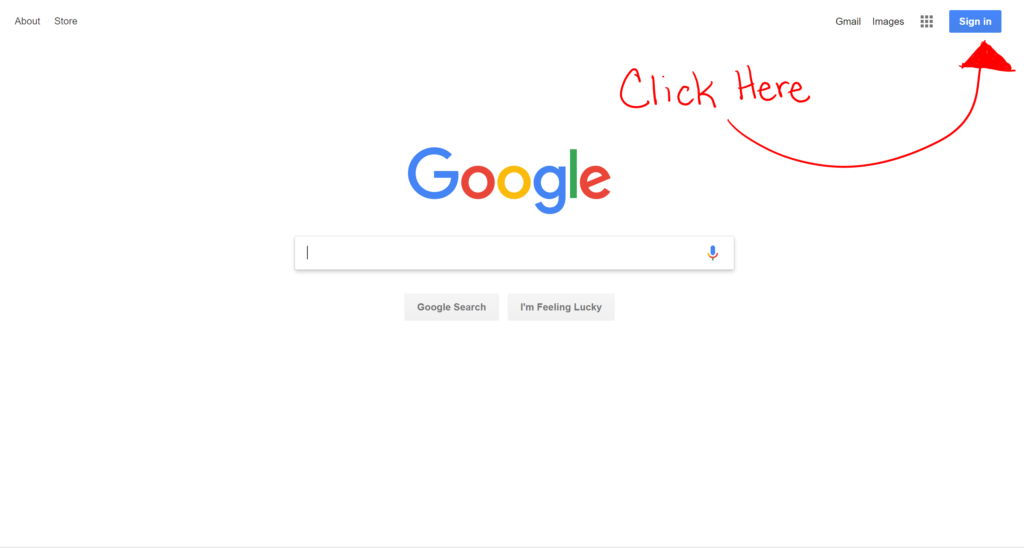
To create your account just go to google.com (yeah! the place you search for recipes and how-tos on). There will be a blue sign-in button in the corner. When you click on this it will take you to a login page. You will use the “create an account” button to create your account.
It takes about a minute to do this and, boom, you have a Google account that you can use for your calendar, email, youtube, drive, etc (keep an eye out for how to use some of the other great tools!-Join my email list HERE).

Now What?
Now that you have a Google account you are all set! To access your calendar on the computer, you can go to the same homepage that you used to sign in. Click on the little waffle-looking icon to find your different apps.
Syncing to your phone
Chances are, you use your phone calendar, especially if your a mom who is managing a household. Using your Google calendar on your phone is just a matter of going into your Calendar settings and putting in your newly created account.
I like to use the actual Google calendar app because I feel like it works better with all of the features that the calendar has. It is easy to download the app and sign in.
Now you’re all set! Now you can start using a shared calendar for your family to preserve your sanity (at least a little).
Like the idea of using Google (or other digital tools) to manage your household?
As I said before, in my workplace I am the go-to person for Google. I figured I should share my knowledge! Google has made my work life easier and my home life. If you want to learn more about how to use Google apps and digital tools to make your household management easier, make sure to follow my posts so you don’t miss any of my Google posts!
I have an email course in the works. If you are interested in receiving this, sign up below! You will receive my 100 indoor activities list right away and when my email course is complete, you will be the first to receive it!


Love this post! I’m also a big google fan but never thought to use it at home too! Thanks for the ideas!
Oh yeah! I use Google for everything!
I. Love. Google!! It has saved my sanity for all of the above reasons plus being the team mom multiple times for multiple teams. I only have to create a team calendar one time, and then when I invite the other parents by email to join it (even if they don’t have a Gmail address) it will sync to their phone app calendars and send the automatic reminders that I tell it to. It makes the whole season easy! Also, my sister forwarded me her flight information awhile ago for a trip and Google automatically synced the information from the email and each part of her flight was automatically added to my calendar. So cool!
Oh, that’s awesome! It really is so useful in so many settings for everyone to have access to the same calendar.
My husband and I started sharing a calendar earlier this year and it has made a HUGE difference! We also love sharing Google Sheets for making lists.
Yes! I love Google Sheets!! I make spreadsheets for just about everything… LOL My husband makes fun of me but they are so useful and you can make them do so many things to where it does the work for you!
Hello ,
I saw your tweets and thought I will check your website. Have to say it looks really nice!
I’m also interested in this topic + have recently started my journey as young entrepreneur.
I’m also looking for the ways on how to promote my website. I have tried AdSense and Facebok Ads, however it is getting very expensive. Was thinking about starting using analytics. Do you recommend it?
Can you recommend something what works best for you?
I also want to improve SEO of my website. Would appreciate, if you can have a quick look at my website and give me an advice what I should improve: https://janzac.com/
(Recently I have added a new page about Rockwall Investments and the way how normal people can make money with this company.)
I have subscribed to your newsletter. 🙂
Hope to hear from you soon.
P.S.
Maybe I will add link to your website on my website and you will add link to my website on your website? It will improve SEO of our websites, right? What do you think?
Regards
Jan Zac
I’m still pretty new too! Your site looks great! I love learning how to make money and passive income. Most of my traffic at this point comes from social networks and Pinterest. I use Google Analytics to see where my traffic is coming from so that I can optimize how I use that platfrom (mostly Facebook right now). I do not at this point spend much on promoting my blog. Every so often I might buy a Facebook ad.
[…] night is critical to your marriage! Find that time to share with your partner. Mark a date in your shared family calendar, and book a babysitter in advance if you need to. If anything tries to impinge on the date you have […]